We're still refining the site — some content may change as TMVector evolves.
Skip the Standup
A live, always-on view of work across teams, projects, and time zones — no extra meetings required. Organize multiple workspaces and nested folders with granular roles and permissions that control who can access what. Connect work across teams and workspaces into unified views for better visibility and progress tracking.
Free forever for small teams* · Free beta access* · No credit card required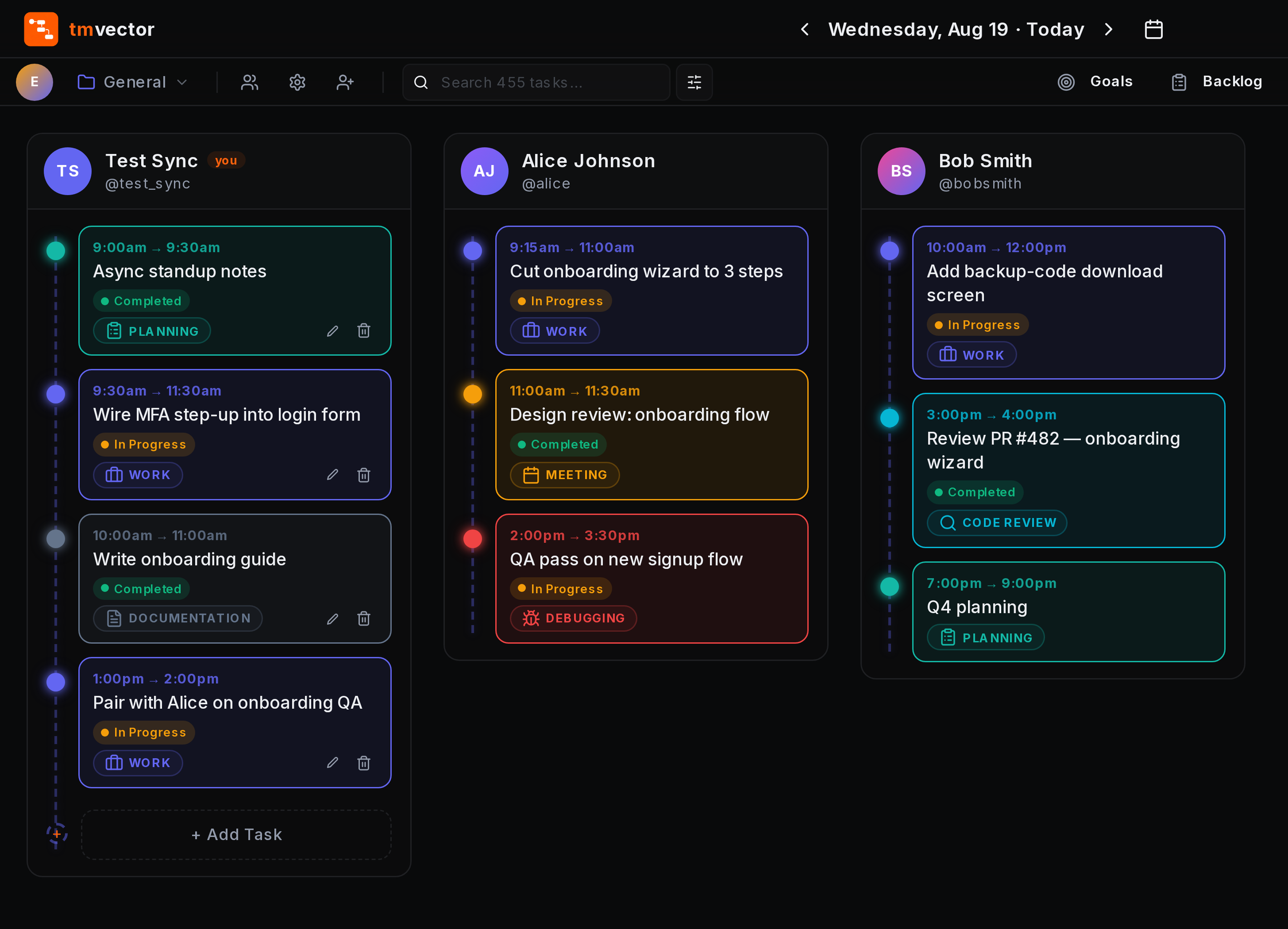
Be the first to know when we launch
Drop your email and we'll notify you the moment TMVector opens up. No spam, unsubscribe any time.
Structure It However You Work
Workspaces hold folders, folders hold subfolders — nest as deep as your team needs, then log work right where it belongs.
Everything Your Team Needs
From daily execution to organizational planning, TMVector brings work, visibility, and collaboration together in one structured workspace.
Real-Time Timeline
Calendar, Stack & Canvas views with real-time updates. Changes appear instantly across your team's screens.
Task Management
Flexible task organization with statuses, categories, rich notes, and searchable task history.
Backlog & Blockers
Lightweight issue tracking with priorities, assignees, due dates, and blocker visibility.
Sprint Documents
Structured sprint planning with notes, progress, retrospectives, and export options.
Goals & OKRs
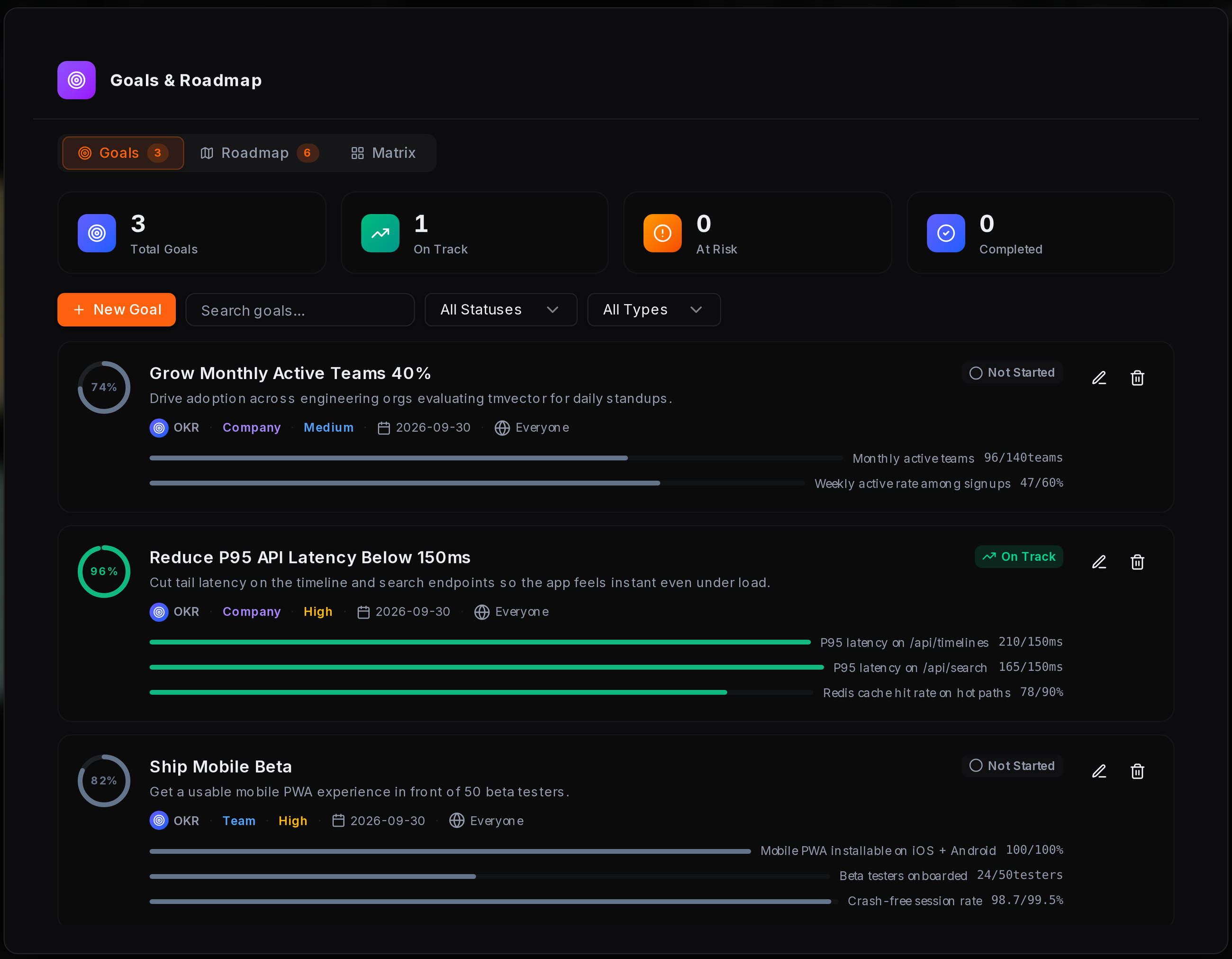
Define and track goals using OKR, KPI, SMART, FAST, or WISE frameworks, with measurable progress across teams and workspaces.
Product Roadmap
Quarter-grouped roadmap with Features, Milestones, Epics. Linked to goals and tags.
Unified Workspaces
Connect selected workspaces and folders into consolidated views, giving leaders visibility across teams without switching between workspaces.
Notification Controls
Configure notifications by event, delivery channel, and member. Choose what reaches you in-app, by email, or not at all.
Instant Search
Search across tasks, notes, and timeline activity to find what you need quickly.
Multi-Workspace Management
Create separate workspaces for teams, projects, or business units, with granular roles, permissions, and visibility controls.
Canvas & Sticky Notes
Flexible sticky notes for ideas, feedback, and action items — organized visually with real-time collaboration across your team.
Insights & Analytics
Track velocity, KPIs, workload trends, and category breakdowns across teams and workspaces.
Built for Every Team Workflow
From individual contributors to organizational leaders, TMVector adapts to how teams plan, execute, and collaborate.
Everyone Knows What Everyone's Building
Give every team member a real-time view of ongoing work. TMVector keeps tasks, progress, and updates visible across the team — reducing status meetings and manual follow-ups.
Real-time task updates across team members
Calendar and Stack views for different working styles
Comments and @mentions directly on tasks
Align Work With Organizational Goals
Connect daily work with measurable organizational, team, and individual goals. Choose the methodology that fits your organization and track progress as work evolves.
OKR, KPI, SMART, FAST, and WISE methodologies
Company, team, and individual goal hierarchy
Progress tracking from linked work
Granular visibility and access controls
From Sprint Planning to Retrospective
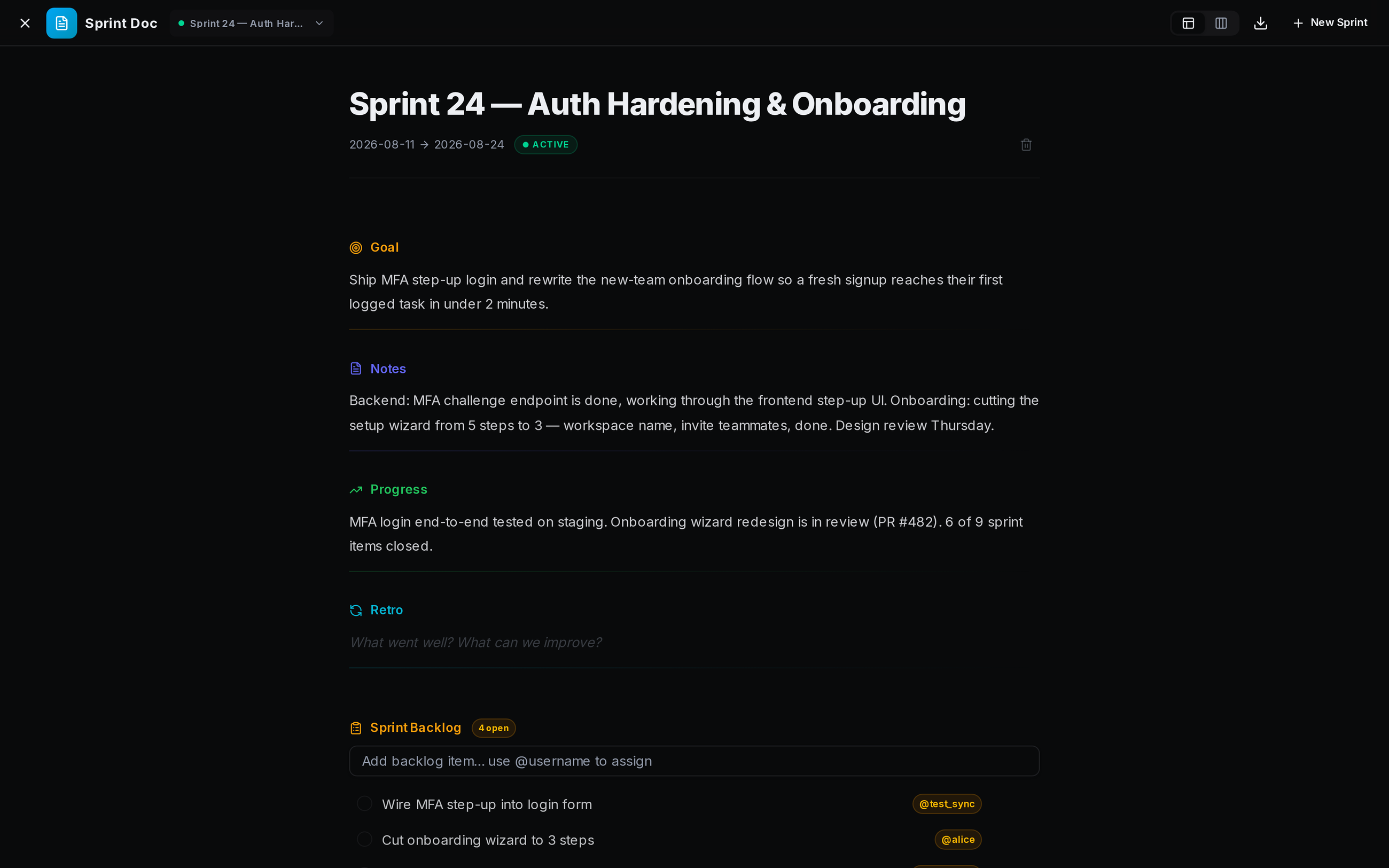
Keep sprint planning, progress updates, and retrospectives in one persistent workspace. Sprint Docs give teams a structured place to capture decisions, progress, notes, and outcomes.
Structured Goal, Notes, Progress, and Retro sections
Custom sections for different team workflows
Markdown and PDF export
One View Across the Organization
Bring selected workspaces and folders together into a unified view. Leaders can understand progress, workload, blockers, and goals across teams without switching between workspaces.
Aggregate work across linked workspaces
Link selected workspaces and folders into unified views
Cross-team progress and workload visibility
Blocker and goal visibility
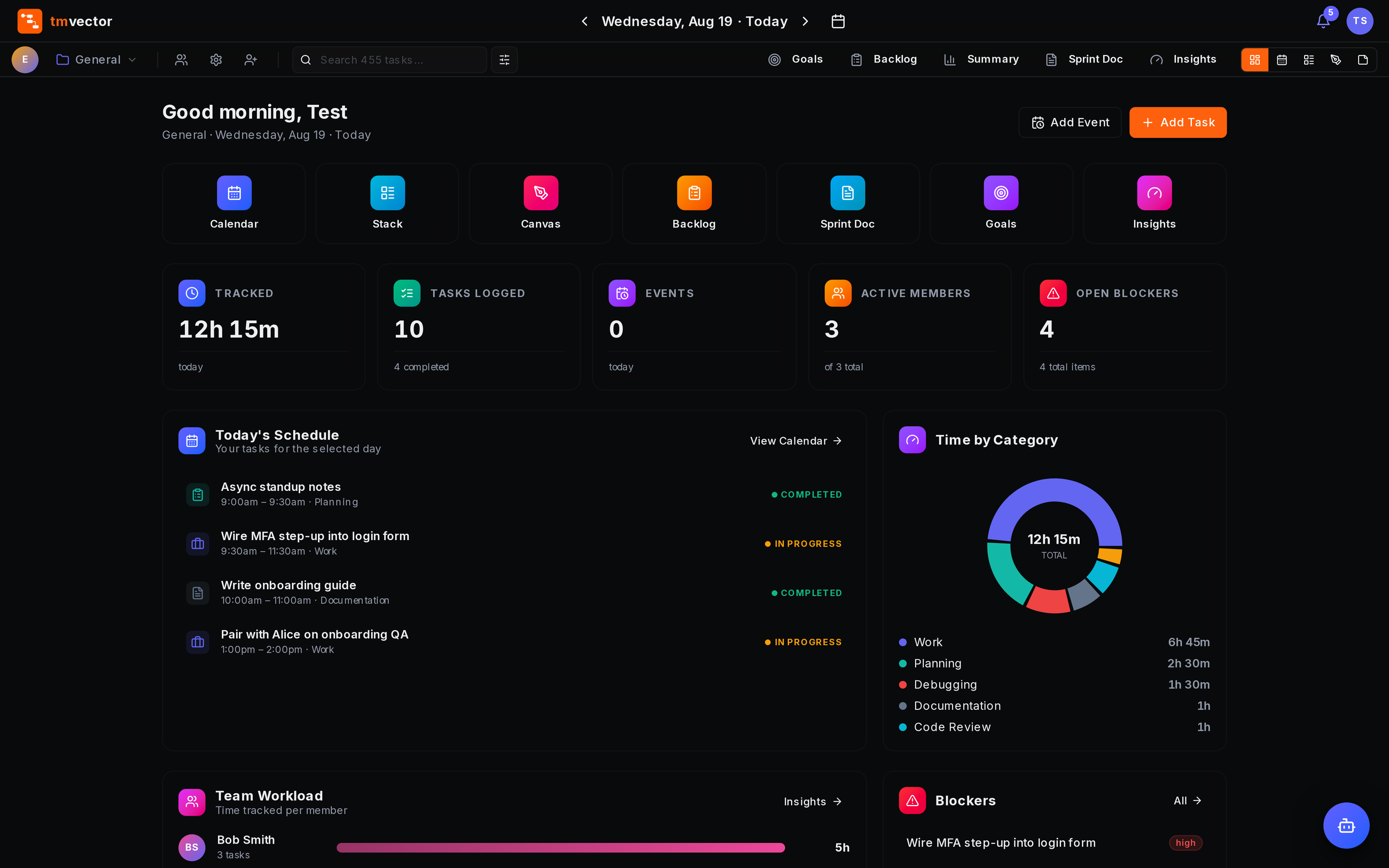
Plan What Comes Next
Connect long-term planning with the work happening today. Build roadmaps around initiatives, releases, milestones, and features while keeping them connected to goals and execution.
Features, milestones, epics, releases, and initiatives
Tags and linked goals
Visibility controls by team or workspace
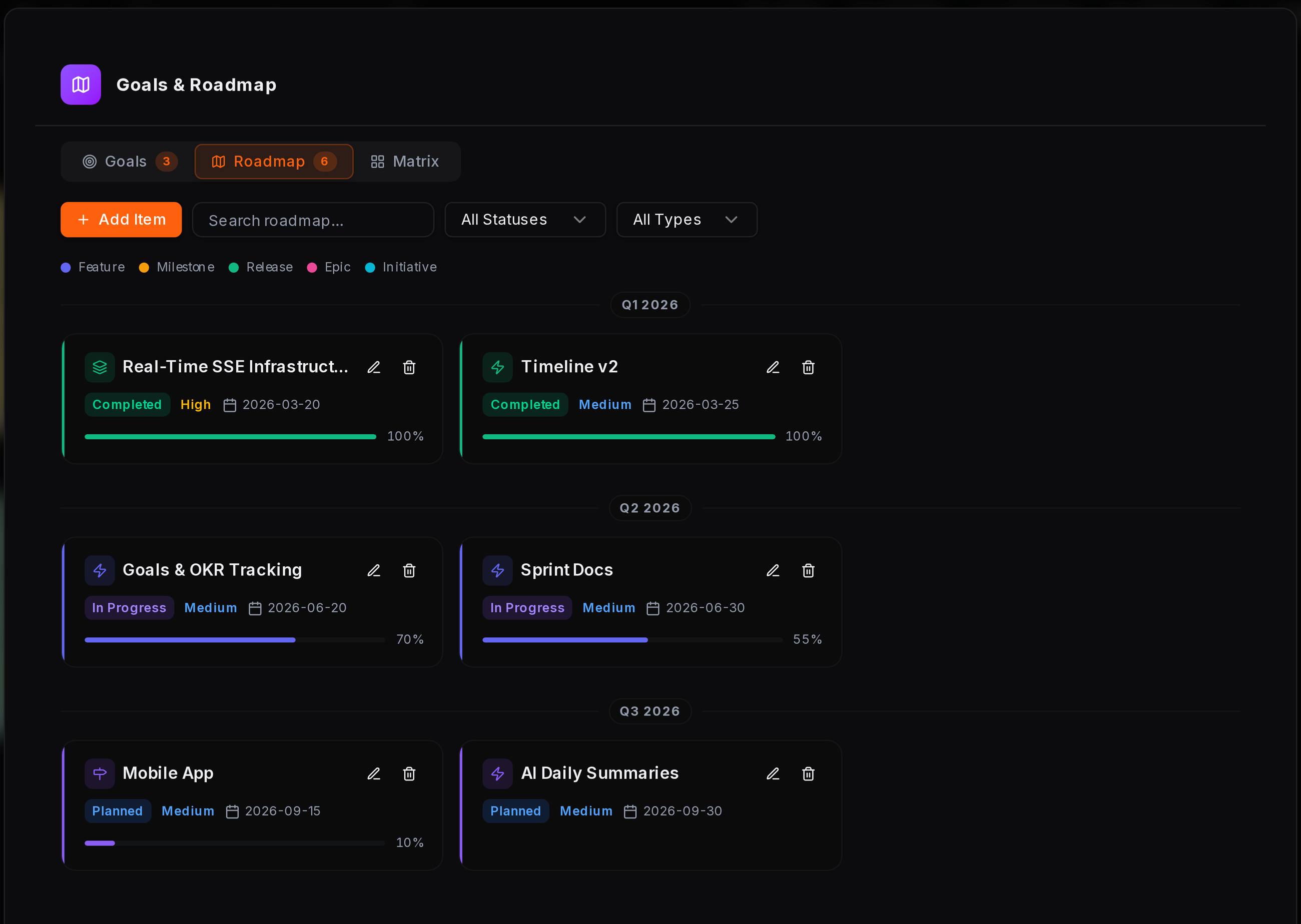
A Visual Workspace for Ideas and Planning
Capture ideas, feedback, and action items visually using Canvas and Sticky Notes. Sketch, organize, and collaborate without leaving your workspace.
Freehand drawing, sticky notes, and checklists
Visual organization for ideas and feedback
Real-time updates and automatic saving
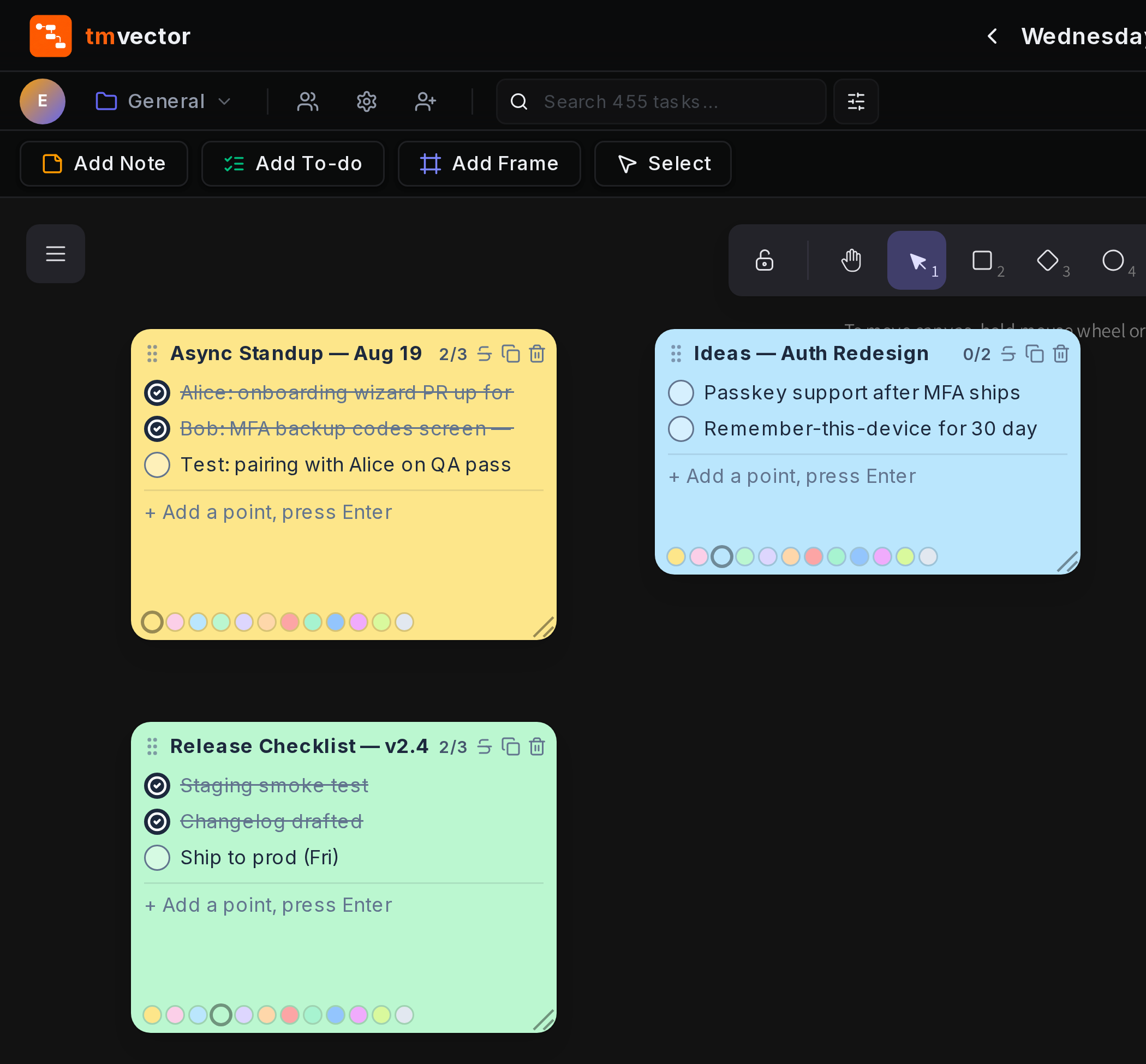
Turn Work Into Actionable Insights
Understand how work is progressing across teams and workspaces. Track trends, KPIs, workload, and category breakdowns over time without exporting data manually.
Velocity and activity trends
KPI cards with period-over-period comparisons
Category breakdowns across teams and workspaces
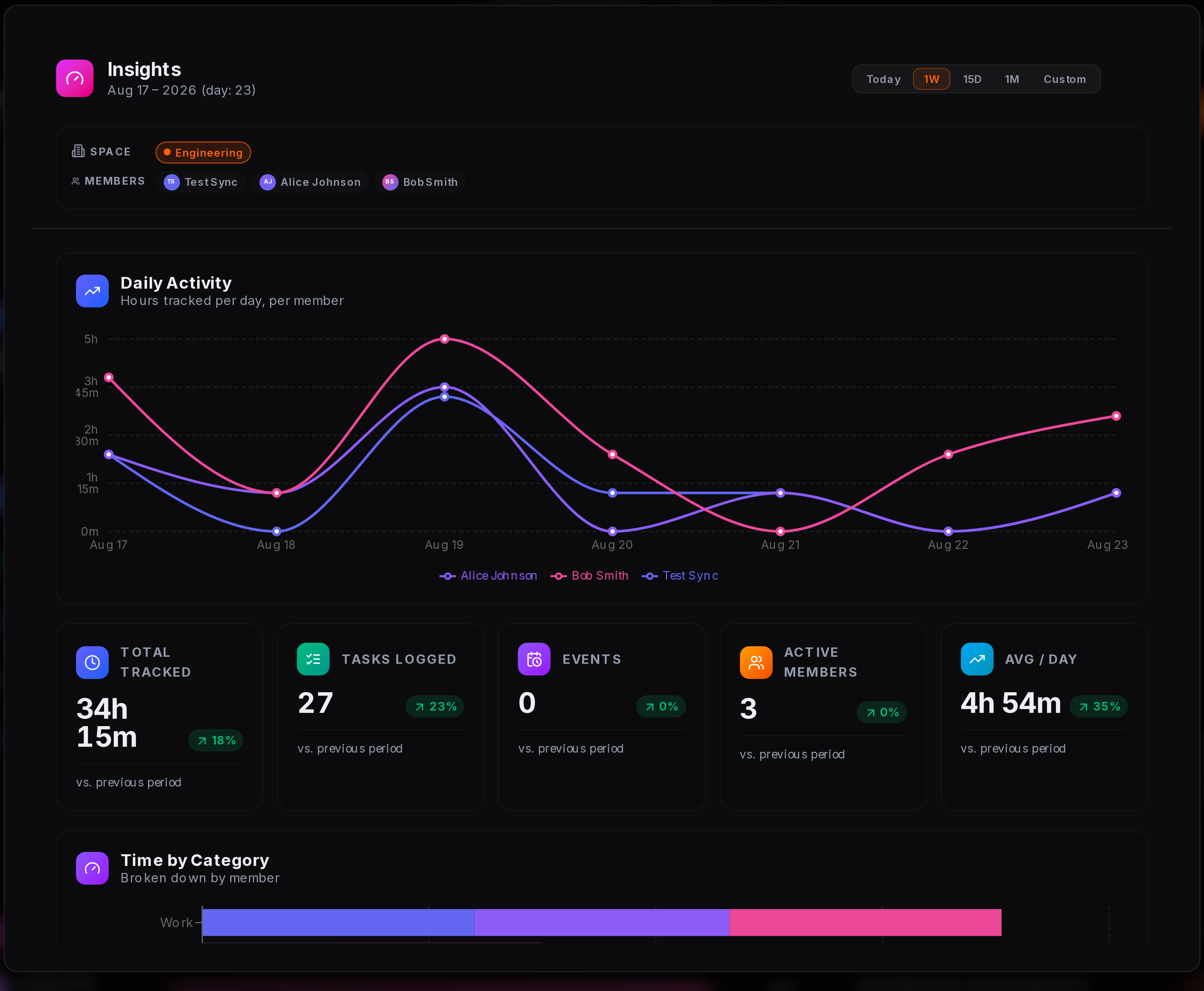
Control Who Sees What
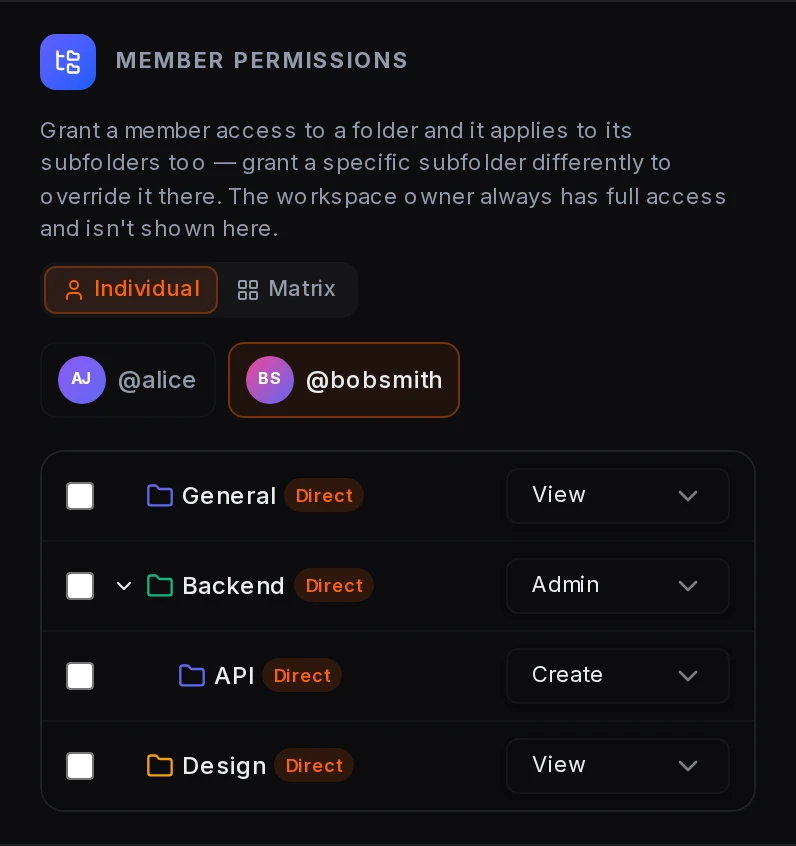
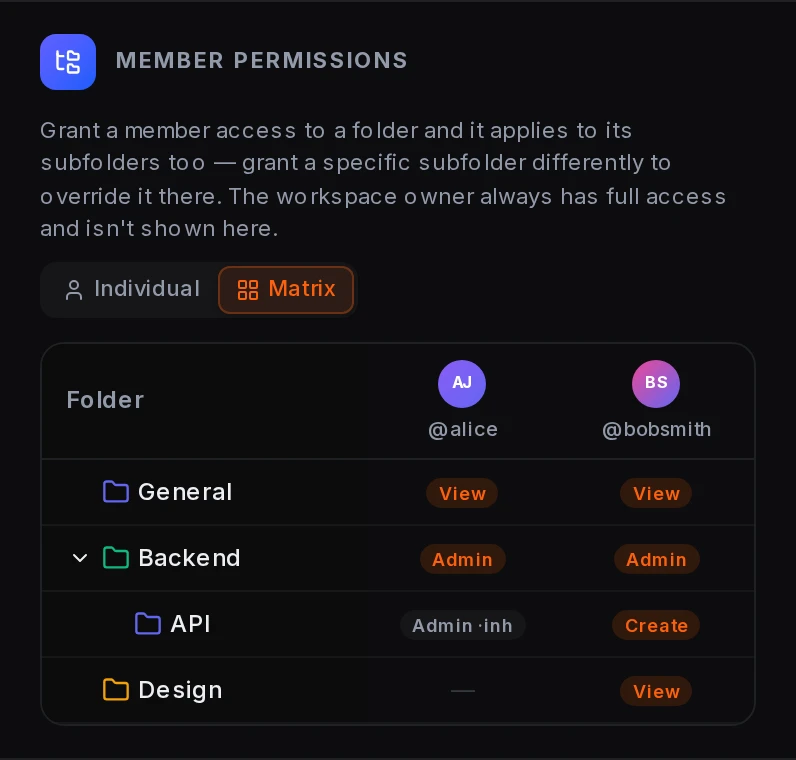
Structure work across workspaces, teams, projects, and nested folders with granular roles and permissions. Give a member administrative access to one area while limiting their access elsewhere — all from the same account.
Per-folder permissions for View, Create, and Admin
Permissions cascade through nested folders with branch-level overrides
Unified visibility into member access across the workspace
Set Up in Minutes
From individual teams to organization-wide visibility, TMVector keeps work structured, connected, and accessible at every level.
Create Workspaces
Create separate workspaces for teams, departments, projects, or business units and define who can access them.
Organize & Track Work
Structure work with folders, tasks, timelines, statuses, and views that fit how each team operates.
Connect Goals & Execution
Connect goals, sprints, roadmaps, and daily work so teams can move from planning to execution without losing context.
Unify with Dashboards
Link selected workspaces and folders into consolidated dashboards, giving leaders a real-time view of progress across teams and projects.
Apply for Beta Access
We're onboarding a limited number of teams for free beta access before public launch. Tell us about your team and we'll be in touch.
Free of cost for accepted teams — no credit card required.
Everything Connects to the Work
Connect daily execution, team collaboration, and organizational visibility in one structured workspace.
Capture Work
Tasks, notes, and ideas start in one place. Log work through tasks, Canvas, and Sticky Notes — from structured action items to quick ideas and feedback.
Organize Work
Structure work around how your organization operates. Create multiple workspaces, teams, projects, and nested folders to keep work organized at every level.
Connect Goals
Connect daily execution to larger objectives. Link work to OKR, KPI, SMART, FAST, or WISE methodologies and track progress as work moves forward.
Stay in Sync
Keep everyone aligned without constant status meetings. Tasks, comments, updates, sprints, and planning stay synchronized across teams and time zones.
Unify Workspaces
Bring related work together without moving it. Link selected workspaces and folders to create consolidated views across teams, projects, or business units.
See the Bigger Picture
Give leaders visibility without adding another reporting layer. Consolidated dashboards and insights reveal progress, workload, blockers, and trends across the work that matters.
Capture Work
Tasks, notes, and ideas start in one place. Log work through tasks, Canvas, and Sticky Notes — from structured action items to quick ideas and feedback.
Organize Work
Structure work around how your organization operates. Create multiple workspaces, teams, projects, and nested folders to keep work organized at every level.
Connect Goals
Connect daily execution to larger objectives. Link work to OKR, KPI, SMART, FAST, or WISE methodologies and track progress as work moves forward.
Stay in Sync
Keep everyone aligned without constant status meetings. Tasks, comments, updates, sprints, and planning stay synchronized across teams and time zones.
Unify Workspaces
Bring related work together without moving it. Link selected workspaces and folders to create consolidated views across teams, projects, or business units.
See the Bigger Picture
Give leaders visibility without adding another reporting layer. Consolidated dashboards and insights reveal progress, workload, blockers, and trends across the work that matters.
Security by Design
Built with security and administrative controls at the foundation — giving teams control over authentication, sessions, access, and workspace activity.
Secure Authentication
Secure password storage and controlled authentication flows help protect account access.Active Sessions
Review active devices and revoke individual sessions or sign out everywhere else.Granular Access Control
Control access across workspaces, teams, and nested folders with configurable roles and permissions.Audit Logs
Track important workspace and administrative activity, including permission changes.Notification Controls
Configure event notifications by channel — in-app, email, or off.Member Activity
Follow specific members when you need visibility into their work without subscribing to every workspace event.Frequently Asked Questions
Everything you need to know before signing up.
TMVector gives every team member a live view of what's happening, so status meetings and manual check-ins become unnecessary. Work stays synchronized across connected users in real time — when a task or other shared data changes, updates are reflected across the relevant views without requiring a manual refresh.
A workspace provides a dedicated area for a team, project, department, or other organizational unit. Each workspace can have its own members, tasks, folders, goals, sprints, and settings. Workspaces can also be linked to create consolidated views across related work.
Yes. You can create multiple workspaces for different teams, projects, departments, or business units. Each workspace can have its own members, permissions, folders, tasks, and settings.
Permissions can be assigned at the workspace and folder level. Access can be granted for different roles such as View, Create, or Admin, with permissions cascading through nested folders and individual branches available for overrides.
Yes. Selected workspaces and folders can be linked into consolidated views. This allows managers and leaders to bring relevant work from multiple teams or workspaces into one place without moving the underlying work.
Dashboard mode provides a consolidated view of linked workspaces and folders. It allows managers and leaders to see relevant work, activity, and progress across multiple teams without switching between workspaces.
TMVector supports multiple goal-setting methodologies, including OKR, KPI, SMART, FAST, and WISE. This allows teams to use the framework that best fits their planning and performance model.
Yes. Notification preferences can be configured by event and delivery method. Choose which activities notify you in-app, by email, or not at all, and follow specific members when you only want updates about their activity.
TMVector uses secure password hashing, server-side session controls, HTTPS/TLS for data in transit, granular workspace permissions, and audit logging for important workspace activity. You can also review active sessions and revoke access from other devices.
Native integrations with tools such as Jira and Linear are planned. In the meantime, supported API/webhook capabilities can be used to connect TMVector with external systems.
Canvas is a shared workspace for sketches, sticky notes, and checklists. Changes are saved and synchronized for the team, but it is not currently designed as cursor-by-cursor multiplayer collaboration like Figma.
Ready to Unify Your Team's Work?
Built for async, distributed teams.
Free forever for small teams* · Free beta access* · No credit card required